Vibe-coding a debugger for a DSL
Earlier this week a colleague of mine, Emilio Jesús Gallego Arias, shared a demo of something he built as an experiment, and I felt the desire to share this and add a bit of reflection. (Not keen on watching a 5 min video? Read on below.)
What was that?
So what did you just see (or skipped watching)? You could see Emilio’s screen, running VSCode and editing a Lean file. He designed a small programming language that he embedded into Lean, including an evaluator. So far, so standard, but a few things stick out already:
- Using Lean’s very extensible syntax this embedding is rather elegant and pretty.
- Furthermore, he can run this DSL code right there, in the source code, using commands like
#eval. This is a bit like the interpreter found in Haskell or Python, but without needing a separate process, or like using a Jupyter notebook, but without the stateful cell management.
This is already a nice demonstration of Lean’s abilities and strength, as we know them. But what blew my mind the first time was what happened next: He had a visual debugger that allowed him to debug his DSL program. It appeared on the right, in Lean’s “Info View”, where various Lean tools can hook into, show information and allow the user to interact.
But it did not stop there, and my mind was blown a second time: Emilio opened VSCode’s „Debugger“ pane on the left, and was able to properly use VSCode’s full-fledged debugger frontend for his own little embedded programming language! Complete with highlighting the executed line, with the ability to set breakpoints there, and showing the state of local variables in the debugger.
Having a good debugger is not to be taken for granted even for serious, practical programming languages. Having it for a small embedded language that you just built yourself? I wouldn’t have even considered that.
Did it take long?
If I were Emilio’s manager I would applaud the demo and then would have to ask how many weeks he spent on that. Coming up with the language, getting the syntax extension right, writing the evaluator and especially learning how the debugger integration into VSCode (using the DAP protocol) works, and then instrumenting his evaluator to speak that protocol – that is a sizeable project!
It turns out the answer isn’t measured in weeks: it took just one day of coding together with GPT-Codex 5.3. My mind was blown a third time.
Why does Lean make a difference?
I am sure this post is just one of many stories you have read in recent weeks about how new models like Claude Opus 4.6 and GPT-Codex 5.3 built impressive things in hours that would have taken days or more before. But have you seen something like this? Agentic coding is powerful, but limited by what the underlying platform exposes. I claim that Lean is a particularly well-suited platform to unleash the agents’ versatility.
Here we are using Lean as a programming language, not as a theorem prover (which brings other immediate benefits when using agents, e.g. the produced code can be verified rather than merely plausible, but that’s a story to be told elsewhere.)
But arguably because Lean is also a theorem prover, and because of the requirements that stem from that, its architecture is different from that of a conventional programming language implementation:
- As a theorem prover, it needs extensible syntax to allow formalizing mathematics in an ergonomic way, but it can also be used for embedding syntax.
- As a theorem prover, it needs the ability to run “tactics” written by the user, hence the ability to evaluate the code right there in the editor.
- As a theorem prover, it needs to give access to information such as tactic state, and such introspection abilities unlock many other features – such as a debugger for an embedded language.
- As a theorem prover, it has to allow tools to present information like the tactic state, so it has the concept of interactive “Widgets”.
So Lean’s design has always made such a feat possible. But it was no easy feat. The Lean API is large, and documentation never ceases to be improvable. In the past, it would take an expert (or someone willing to become one) to pull off that stunt. These days, coding assistants have no issue digesting, understanding and using the API, as Emilio’s demo shows.
The combination of Lean’s extensibility and the ability of coding agents to make use of that is a game changer to how we can develop software, with rich, deep, flexible and bespoke ways to interact with our code, created on demand.
Where does that lead us?
Emilio actually shared more such demos (Github repository). A visual explorer for the compiler output (have a look at the screenshot. A browser-devtool-like inspection tool for Lean’s “InfoTree”. Any of these provide a significant productivity boost. Any of these would have been a sizeable project half a year ago. Now it’s just a few hours of chatting with the agent.
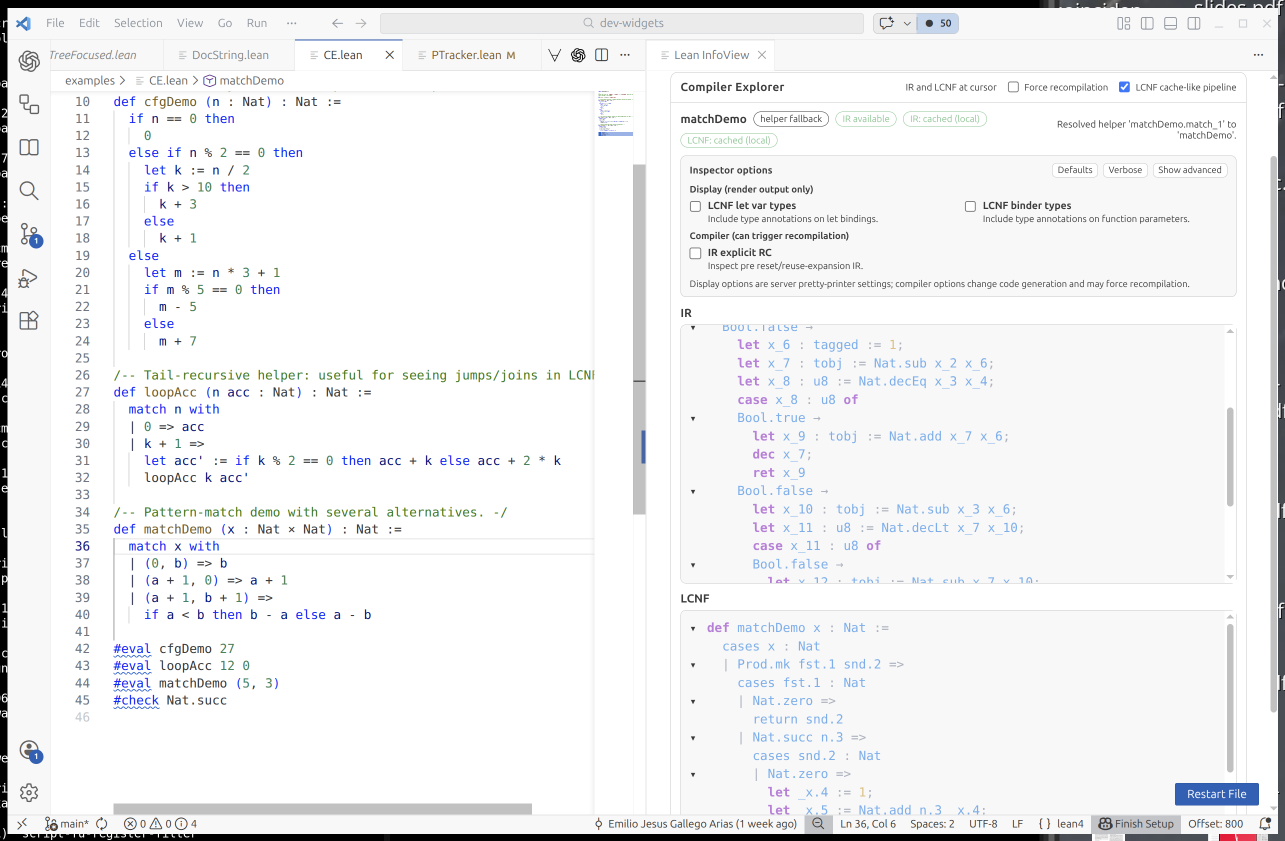
So allow me to try and extrapolate into a future where coding agents have continued to advance at the current pace, and are used ubiquitously. Is there then even a point in polishing these tools, shipping them to our users, documenting them? Why build a compiler explorer for our users, if our users can just ask their agent to build one for them, right then when they need it, tailored to precisely the use case they have, with no unnecessary or confusing feature. The code would be single use, as the next time the user needs something like that the agent can just re-create it, maybe slightly different because every use case is different.
If that comes to pass then Lean may no longer get praise for its nice out-of-the-box user experience, but instead because it is such a powerful framework for ad-hoc UX improvements.
And Emilio wouldn’t post demos about his debugger. He’d just use it.
Have something to say? You can post a comment by sending an e-Mail to me at <mail@joachim-breitner.de>, and I will include it here.